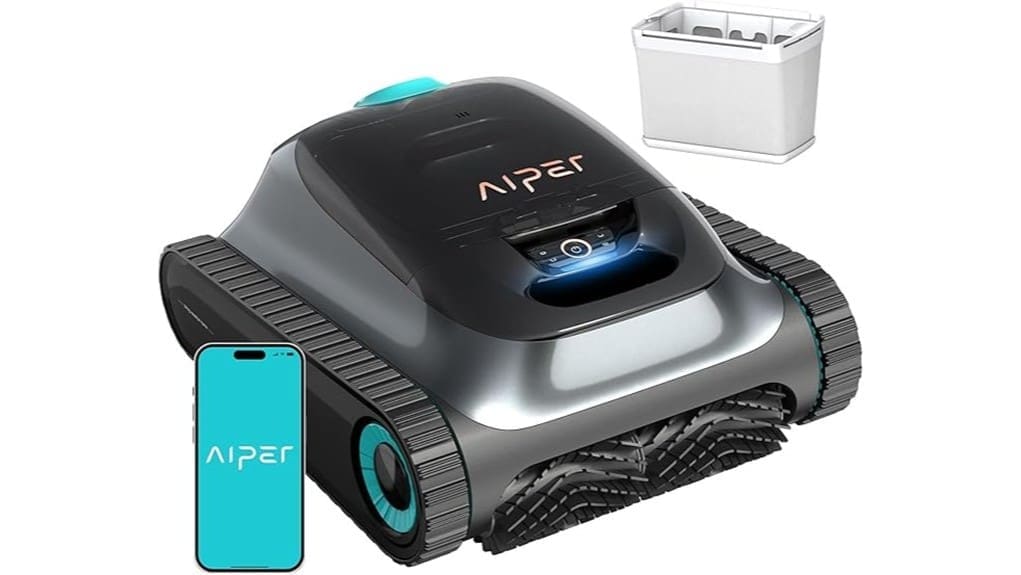
You’ll get a technically capable, maintenance‑minded robotic cleaner with long runtimes (Eco up to 270 min, other modes 180), dual filtration for 3 µm fine and 180 µm coarse debris, and sensor‑fusion navigation that minimizes overlaps. It’s built for large or marine pools, tolerates salt with regular rinsing, and shows route telemetry plus OTA updates. Expect routine filter care and occasional seal service; keep reading to see mode tips, lifecycle data, and alternative options.
Some Key Takeaways
- 2026 Aiper Scuba S1 adds OTA navigation refinements and WavePath dual‑route mapping for fewer blind spots and better corner coverage.
- Eco mode runs up to 270 minutes; Auto/Floor/Wall/Scheduled modes run up to 180 minutes for varied maintenance intensity.
- Dual‑filter system (3‑µm fine + 180‑µm coarse) captures dust, algae, leaves, and reduces motor wear when maintained.
- Durable metal/plastic build and saltwater compatibility suit marine pools, but heavy use needs frequent rinsing and filter care.
- Two‑year warranty; best for large pools needing systematic cleaning—avoid tiny plunge pools or users wanting plug‑and‑play simplicity.
Performance Snapshot: Runtime, Cleaning Modes, and Real-World Results
While the Scuba S1‘s headline numbers are impressive, you’ll want to match modes to tasks to get the best results: with up to 270 minutes in Eco mode and 180 minutes across Auto, Floor, Wall, and Scheduled modes, the battery life lets the unit tackle both long, low‑power maintenance runs and shorter, intensive scrubs. You’ll evaluate battery longevity by logging real cycles and noting dropoff under heavy scrubbing. Mode calibration matters: choose Eco for debris maintenance, Floor for sediment, Wall for scum lines, and Scheduled for routine coverage. That discipline maximizes cleaning efficiency and extends service intervals. Homeowners who enjoy their outdoor spaces will appreciate how robotic vacuums can keep pools pristine with minimal effort and regular use of the Scuba S1 robotic pool vacuums.
How Navigation, Sensors, and App Features Affect Coverage and Missed Spots
Matching modes to tasks helps preserve runtime, but coverage ultimately comes down to how the Scuba S1 navigates and senses your pool. You’ll see sensor fusion combine inputs from 11 high‑precision sensors to build a real‑time map, reducing blind spots and systematic overlap via dual‑path WavePath routing. In practice, adaptive navigation cuts missed corners, though complex geometries can still confuse edge tracking. Use the app: app telemetry shows route heatmaps and runtime metrics so you can tweak modes or schedule repeats for shadowed zones. OTA updates refine algorithms, so expect incremental coverage improvements rather than dramatic leaps. Designed for homeowners who enjoy outdoor spaces, the Scuba S1 helps maintain a relaxing pool environment with effortless pool cleaning.
Filtration, Debris Capture, and Maintenance Costs of the Dual-Filter System
Many owners will appreciate the Scuba S1’s dual-filter arrangement: a replaceable 3‑micron ultra‑fine cartridge paired with a 180‑micron standard filter traps everything from fine dust and sand to leaves and larger debris, letting you tailor filtration to water conditions. You’ll evaluate capture efficiency by matching filter type to debris load; the fine cartridge excels with dust and algae, the coarse with leaves. Track filter lifespan by hours of use and visible clogging. Consider replacement pricing against expected longevity. Set cleaning frequency to prevent flow loss. Follow local regulations for cartridge disposal to avoid contamination. This system pairs well with choosing the right filter cartridges to keep your pool clean and maintain healthy outdoor spaces.
Durability, Warranty, and Reliability for Frequent Marine or Heavy-Use Pools
Good filtration matters for longevity: if you’re running the Scuba S1 frequently in marine or heavy‑use pools, trapped grit and organic matter will stress seals, motors, and brushes faster than in lightly used residential setups. You’ll appreciate the dual filters, but you must clean them often to preserve marine durability and corrosion resistance. The metal/plastic build is robust, yet salt and constant abrasion accelerate wear; scheduled maintenance and rinsing with fresh water are essential. Warranty implications are clear: the 2‑year coverage helps, but heavy use reliability depends on your upkeep and documented service history to support claims. Using the right filter powder and keeping filters properly maintained will improve water clarity and reduce abrasive wear on moving parts.
Who Should Buy the Aiper Scuba S1 (X5 Pro 2026) : Use Cases, Alternatives, and Final Verdict
While the Scuba S1 (X5 Pro 2026) excels at heavy-duty scrubbing and long runtimes, you should pick it only if your pool needs systematic, low‑overlap cleaning and you’ll commit to routine maintenance. You should buy it if you manage large or marine-exposed pools, need saltwater compatibility, want dual filtration for fine debris, and value app scheduling plus OTA updates. Skip it for tiny plunge pools or if you need ultra‑simple plug‑and‑play gear. Alternatives include lightweight cordless cleaners for small pools and commercial-grade scrubbing units for extreme fouling. Final verdict: a technically strong, maintenance-minded choice with solid installation ease. Consider pairing it with a variable speed pump for quieter, more energy-efficient circulation and optimized cleaning performance.
Some Questions Answered
Does the Scuba S1 Work in Saltwater or Chlorinated Pools Without Corrosion Issues?
Yes — you can use the Scuba S1 in saltwater or chlorinated pools without major corrosion issues. You’ll benefit from saltwater compatibility because the unit uses anti corrosion materials (metal parts treated/coated and durable plastics). Still, you should rinse and dry the cleaner after heavy salt exposure, follow maintenance schedules for filters and seals, and run OTA-updated firmware to keep sensors and navigation reliable for long-term performance.
Can I Control the Robot Without My Phone or When Offline?
Yes — you can use Manual controls and limited Offline mapping without your phone. You’ll operate basic functions directly on the unit or via onboard buttons for start/stop, mode select and spot cleaning. Full scheduling, advanced path editing and detailed logs require the app and online access. Offline mapping stores a simple local map for repeat runs, but real-time optimization and OTA updates need a connected device.
How Long Does the Battery Take to Fully Recharge?
The battery fully recharges in about 4–5 hours using the supplied charger. You’ll get a fast recharge compared with older models, letting you return to cleaning quickly after long Eco or Auto runs. That shorter charge time helps preserve battery lifespan when you follow recommended charge/discharge cycles and avoid deep discharges. Monitor charging via the app and firmware updates to optimize charging behavior and extend overall battery lifespan.
Are Replacement Filters and Parts Widely Available and Affordable?
Yes — replacement filters and spare parts are generally available and reasonably priced. You can buy replaceable 3-micron ultra-fine filter cartridges and 180-micron standard filters through the manufacturer and major retailers. Spare parts like brushes and motors are stocked by authorized dealers and third-party suppliers. You’ll find competitive pricing, clear part numbers, and straightforward compatibility info, so you can maintain performance without high downtime or excessive cost.
Is the Unit Safe to Use Around Pool Heaters and Solar Covers?
Yes — you can use it safely around pool heaters and solar covers. You’ll want to monitor sensor interference from strong heat sources; the robot’s 11 high‑precision sensors and adaptive navigation usually compensate, but intense IR or magnetic fields can confuse routing. Rely on thermal protection features and avoid direct contact with hot heater surfaces. Always test short runs near heaters/covers first, and keep firmware updated for improved sensor calibrations.