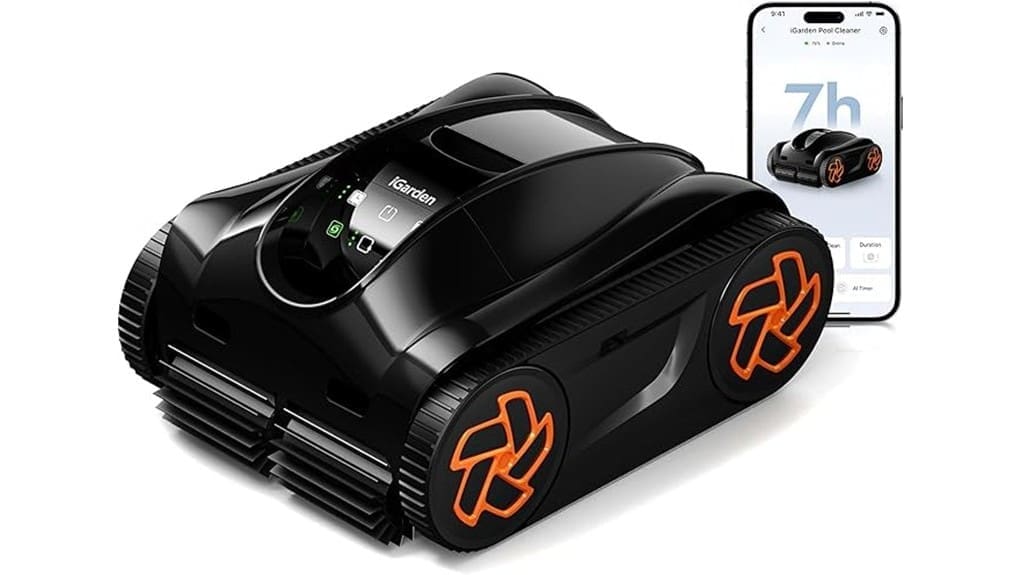
The iGarden K70 is a premium, hands-off robotic cleaner that you’ll appreciate if you want thorough, reliable pool care. It combines 3D S‑Path navigation, triple brushless motors, and a 4L mega basket for strong suction, good coverage, and effective scrubbing; Turbo mode tackles stains and silt. Battery life is long and charging is reasonable, while the touchscreen and app make controls simple. It’s pricey and hefty, but keep going to see full performance, tradeoffs, and alternatives.
Some Key Takeaways
- Powerful hands-off cleaner with 3D S Path navigation and adaptive torque for reliable, full-pool coverage.
- Long runtime: ~3.75-hour full cycle or ~7 hours concentrated floor cleaning, 5-hour recharge.
- 4L mega basket and dual rubber brushes capture leaves, toys, and fine silt effectively.
- Premium features include touchscreen, app scheduling, OTA updates, and Turbo mode for stubborn stains.
- Tradeoffs: heavy (21.6 lb), premium price, and moderate brush wear on rough surfaces.
Verdict and Quick Specs: Should You Buy the iGarden K70?
Though it’s packed with advanced tech, the iGarden K70 is still easy to recommend if you want a powerful, hands-off pool cleaner for both in-ground and above-ground pools. You’ll get strong battery runtime, a 4 L mega basket, triple brushless motors, and OTA updates—features that justify a premium in price comparison. If you value convenience and low maintenance, it’s a solid buy. Check customer reviews for real ownership notes on durability and support; many praise the warranty and touchscreen. You’ll want to weigh upfront cost against long-term efficiency, coverage claims, and the three-year protection. Many homeowners who enjoy their outdoor spaces find robotic vacuums keep pools pristine with minimal effort.
Real-World Cleaning Performance: Coverage, Suction, Brushes, and Turbo Mode
When you set the K70 to work, its 3D S Path navigation and adaptive torque reliably map and cover pool surfaces so you rarely see missed spots; in tests a single 3.75‑hour full‑pool run cleaned most mid‑size inground pools, while a 1‑hour cycle handles routine floor maintenance. You’ll notice strong, consistent suction—Turbo mode boosts suction to remove stains and fine silt quickly—but it draws noticeably more power. Dual active rubber brushes grip and scrub effectively; long‑term brush wear seems moderate on rough surfaces. Noise levels are acceptable for day use but rise in Turbo. Filtration captures large debris to fine silt. This performance makes the K70 a great fit for homeowners focused on maintaining their outdoor living spaces.
Battery, Runtime, and Charging: What to Expect for Full-Pool Sessions
If you plan multi-session cleaning, the K70’s 25.2V/192Wh lithium‑ion pack gives predictable, long runtimes: expect about 7 hours for concentrated floor work and roughly 3.75 hours to cover a full pool on a single run. You’ll appreciate 5‑hour charging for quick turnarounds; a single charge can support a 1‑hour cycle every three days for about 12 sessions. Evaluate battery lifespan by tracking charge cycles and avoiding full‑discharge storage. Follow charging etiquette: recharge after long runs, store at partial charge in cool conditions, and use the supplied charger. That preserves capacity and guarantees consistent full‑pool performance. Consider pairing the K70 with a variable speed pump to maximize energy efficiency and quieter operation.
Navigation, Controls, and App Features: How 3D S Path and the Touchscreen Work
Because the K70 pairs 3D S Path navigation with a full‑screen touchscreen and app control, you get a clear, hands‑on way to manage coverage and performance. You’ll see effective 3D mapping in action: the robot builds a real‑time map, adapts torque for corners and steps, and prioritizes missed zones. The touchscreen responsiveness is smartphone-grade, so on‑device tweaks feel immediate; the app mirrors controls for remote scheduling and Turbo activation. OTA updates refine algorithms over time, but remember app setup must be done on land. Overall, navigation is precise and controls are intuitive, with few gimmicks and solid reliability. The system is ideal for homeowners looking to enhance outdoor living by integrating pool automation into their backyard setup.
Who the K70 Is Best For and Alternatives to Consider
Who should buy the K70 and why? If you run family pools or you’re a low maintenance owner who values hands-off, reliable cleaning, the K70 fits. Its long runtime, 4L mega basket and Turbo mode handle toys, leaves and fine silt without daily fuss. The touchscreen and app let you schedule cycles and tweak performance quickly, and OTA updates keep navigation sharp. Consider alternatives if budget, weight (21.6 lb) or above-ground portability matter: lighter battery models or corded suction cleaners cost less. For heavy-duty commercial use, look to pro-grade robots with bigger motors and service networks. The K70 is designed for homeowners who love relaxing outdoor living and want an effortless pool cleaning solution, especially those prioritizing automatic pool vacuums.
Some Questions Answered
Does the K70 Work With Saltwater Pools and Chlorine Levels?
Yes — you can use the K70 in saltwater pools; it has saltwater compatibility and is built from ABS/PC materials that resist corrosion. You’ll also get good chlorine tolerance for normal residential levels, so routine sanitization won’t harm electronics or brushes. Still, you should rinse the unit after heavy chemical exposure, follow manufacturer maintenance, and avoid prolonged high salinity or extreme chlorine spikes to preserve seals, motors, and battery life.
Can I Schedule Cleanings Remotely via Wi-Fi While Away From Home?
Yes — you can schedule cleanings remotely via Wi-Fi using the app’s remote scheduling, and you’ll trigger cycles, Turbo mode, and presets from anywhere. You should evaluate your router and app settings for Wi Fi security: enable strong passwords, WPA3/WPA2, and two-factor auth if available. OTA updates keep navigation smarter, but verify app permissions and firmware updates before travel so remote scheduling remains reliable and secure.
Is the Battery Replaceable or Upgradeable by the User?
Yes — you can access and replace the battery, but it’s not meant for frequent user swaps. Battery access is designed for service or occasional user replacement; the included 25.2V/192Wh pack can be swapped if you follow manufacturer instructions. Upgrade options are limited to compatible OEM packs (no unofficial mods recommended). For safety and warranty preservation, contact support or use authorized service for replacements or to inquire about higher-capacity upgrades.
What Maintenance Does the Mega 4L Filter Basket Require and How Often?
You should clean the mega 4L filter basket after every use or at an inspection interval of weekly for light use and biweekly for heavy debris. Rinse the mesh with a hose, remove trapped debris, and inspect for tears or clogging. Don’t use harsh chemicals; let it air dry before reinstalling. Replace the basket if mesh or seals show damage. Keep a spare to avoid downtime during maintenance.
Are Replacement Parts and Accessories Readily Available in the US?
Yes — replacement parts and accessories are generally available in the US. You’ll find OEM spares via Local dealers and online retailers, and aftermarket cartridges for the 4L mega basket are sold by third-party suppliers. Check dealer inventory and app/OTA support for compatibility. Warrantied parts may require dealer channels; aftermarket options save money but vary in fit and filtration precision, so compare mesh specs and return policies before buying.